Texas Production Query Tool – A Program for Royalty Owners, Petroleum Engineers, and Mineral Investigators

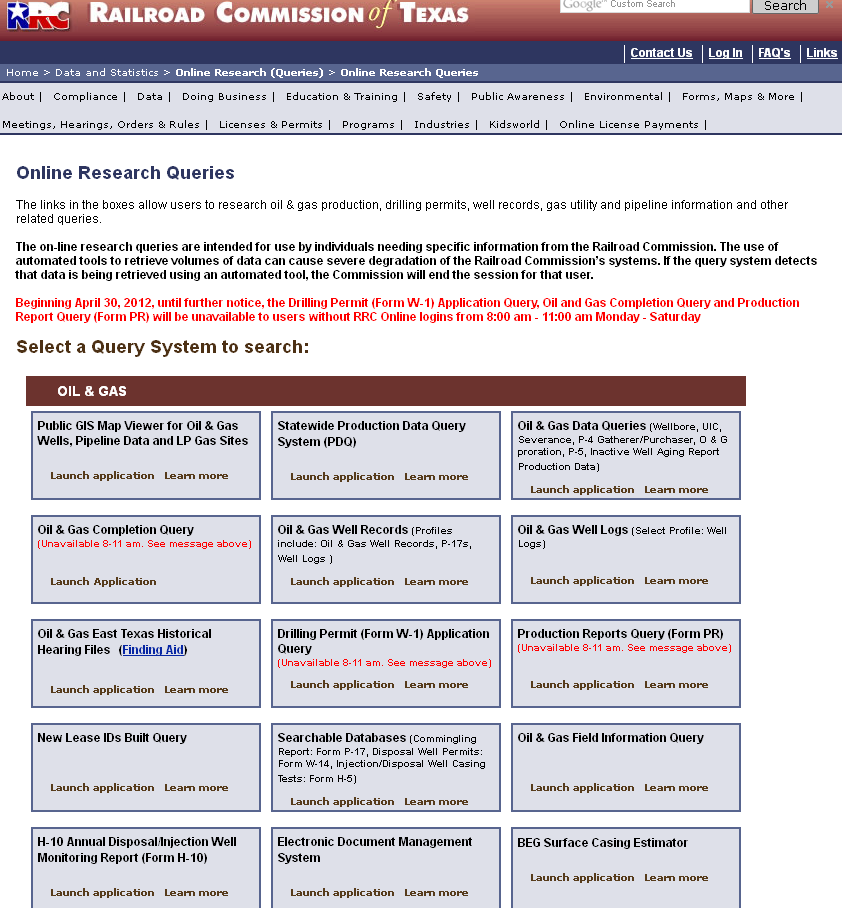
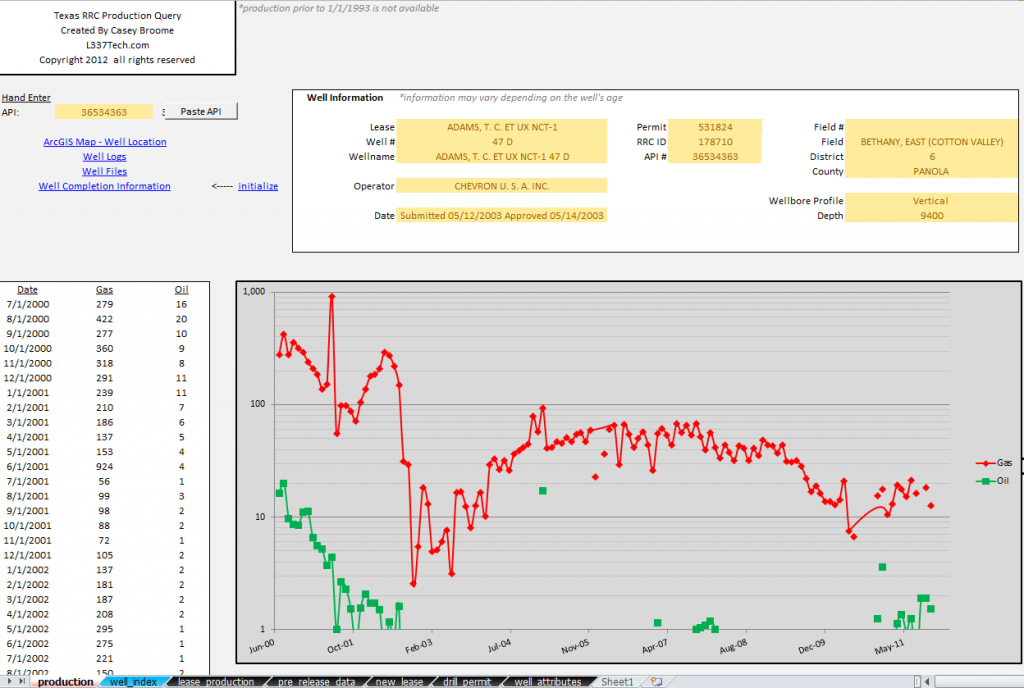
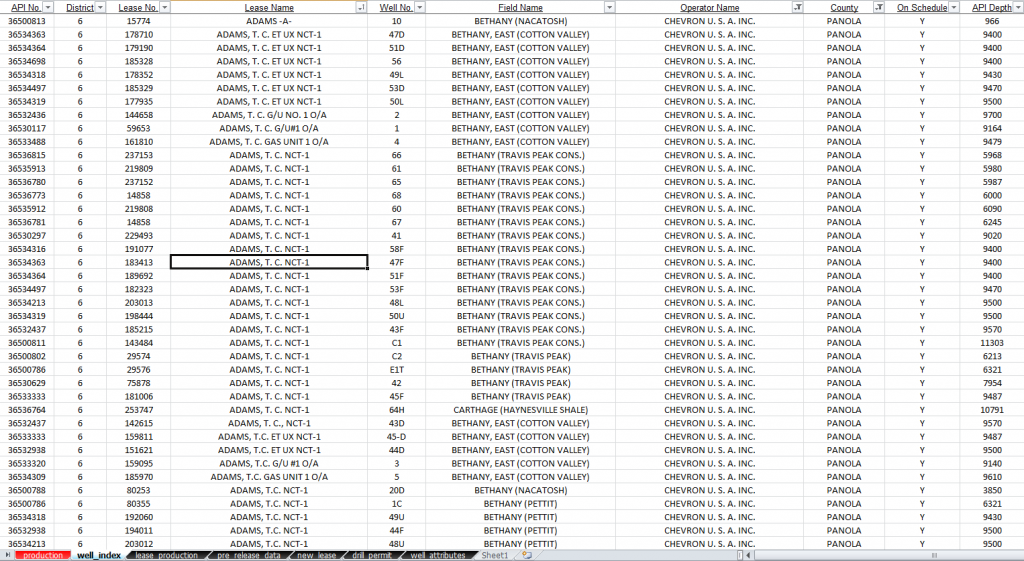
Texas Production Query Tool is a tool designed for royalty owners, petroleum engineers, and anyone else attempting to investigate wells in Texas. This tool allows you to enter an api number or double click a well from the entire Texas active well index to pull up the production data and basic information about the well. The tool also provides direct links to well logs, completion information, arcgis map location, and well file documents. The tool can also pull pre-release production data for wells that are so new they have no lease number. The program figures out if this is the case and looks for the data in the appropriate place seamlessly. This tool is your one stop shop to find out everything about a well in Texas. Since the tool uses Excel as a front end, you can copy down all the api numbers of the wells on your farm or the wells in your investigation into an adjacent column to quickly have access to them again.

[place holder for Demo video....coming soon]

This tool was built and design by Senior Reservoir Engineer with many years in the business (me). This tool was originally built out of necessity to help me investigate certain wells that were very early in their life where data is hard to come by. No one gets data earlier than the state, which makes this tool so powerful since it taps into the data provided by the Texas RRC (rail road commission) web site.

The Texas active well index provided with this tool has all of the active wells in Texas provided in a sortable list. If you know your land is operated by “Chevron” and the county is “Panola” and the lease name starts with “Adams” then simply sort the list like that to find all the wells on your land. The Texas active well list will be updated once a month. Your purchase only guarantees you the list of the month you purchased, but you will be allowed 10 downloads so it is possible to re-download the application in a new month with an updated list. Once you run out of downloads you will need to re-purchase the application.

This program can also be used with tools like my Quick Decline program to estimate ultimate recoveries from wells and generate detailed economics with any interval cashflow and other economic output. Quick Decline is currently unavailable for purchase, but see the example in the demonstration video. Using Texas Production Query Tool and Quick Decline together can help land owners predict royalty payments and Petroleum Engineers predict economics on new projects.

A couple of quick notes about the available Texas well data. Production before 1993 is unavailable. Not all wells have well logs. Only wells completed after 2009 have detailed completion reports available by clicking the completion hyperlink within the program. For these wells you will need to look into the well files. Not all wells have well files (like recently completed well). For these wells use the well completion hyperlink. You maybe prompted about an error being produced for a specific well. This is likely due to production ending before 1993 or the well is too new and has no data. If this occurs the hyperlinks should be your best source of information. Typically production data trails the current date by two or three months depending on the well’s operator. This program does not allocate production back to the well level for lease id’s that have multiple wells. This program requires Office 2007 later to be installed on the computer expected to run this application. The computer should also have around 2GB of RAM installed. You must also have an active connection to the internet.

By clicking the purchase button you understand the data limitations mentioned and program requirements above and are agreeing to these Term Of Service.
Price: $9.99


After completing the purchase process you will be sent an email from our servers with your username, password, transaction id, and a link to the download page. Keep this email forever! This is your way to download updates in the future as well (up to 10 total downloads). You are the only one that has your password. We store it with hash cryptology in our databases so it is unrecoverable. Depending on your email provider this email may wind up in your spam folder. Please check your spam folders if you have not seen the email after 30 minutes. Time to receive the email depends on our server load and your email providers blocking policy. Some providers like “AOL” block the email for hours even a day or few.

Well Index Last Updated 2/1/2012

EZ Paypal IPN Tool – a Java Desktop App

EZ Paypal IPN Tool is a robust Paypal product management system. This tool helps add products to your site as well as manage existing products (or deleting old products). The tool helps simplify an otherwise difficult process of adding ipn listeners and managers to monitor the purchasing and downloading of digital products on your site. This software can also help your site manage physical products as well.

The tool also takes care of the digital product downloading process. It handles users and passwords with modern encryption. The custom scripts provided takes care of everything. They listen for product purchases. Send email to buyer with username and password for download. Verify the user has purchased the product and allows them to download product. All of the scripts work behind the scenes. You will only be using the EZ Paypal IPN Tool to handle adding and managing the products. It is very EASY!.

EZ Paypal IPN Tool also integrates a robust debugging mechanism. The tool sends emails to you with fine details for every IPN transaction or attempt.

This program was created out of necessity to handle all of the purchasing and downloading of digital products and purchasing of physical products on L337Tech.com. This site uses the EZ Paypal IPN Tool exclusively for its product management system. When you buy this product, you will be using the EZ Paypal IPN Tool system including the email notification and the downloading of the product.

Instruction Manual

Detailed instructional video coming soon…

Requirements
-Java 1.6 or higher
-PHP on your website’s server
-ability to ftp to your website’s folder system
-a free account with reCAPTCHA
-an internet connection

Currently this software does not support multiple item purchases or cart purchases. This software is for use with single product purchases.

By clicking the buy now button below, you are greeing to the terms of service below
Price = $9.99


After you have completed the purchase process and PayPal has verified your payment, you will be provided an email with download instruction. Keep this email forever as it contains your permanent username and password for this product. Typical process times range from 1-30minutes. If you do not receive and email after 30 minutes please check your spam folder.

Terms of Service and Disclaimers:

I, Casey Broome, or L337tech.com are not responsible for any damage this app could or may cause to your computer or server or anything else it affects. We are not responsible for any loss or gain of revenue that may occur from using this app. It is the sole responsibility of the user to use this app properly. Use this app at your own risk. The purchase of this app is a one time purchase, and you are purchasing the current version of the app only. The purchase does not include any future updates or newer versions of the app or scripts. You are buying this app as is. This product and website is not affiliated with PayPal.com.

Click on images below for large clear veiw

Add new product page


View, edit, or delete exsisting products


Enter your site’s mysql database credentials


Customize the download pages to match your site


Typical email a buyer is provided after a verified purchase


Download login page to get to the product download page


Product download page

Internet Radio HD – an HP webOS 3 + app

**This app was developed by a Palm Hot Apps Winner developer**
Internet Radio HD Pro is a robust music application used to tap into thousands of online radio stations. Search and listen to thousands of online radio stations easily. Stream internet radio over 2G, 3G, or even Wifi (if your device supports this). Internet Radio HD Pro utilizes both SHOUTcast™ services. Internet Radio HD Pro is an official partner of SHOUTcast™. See this app in HP’s product catalog.

http://www.l337tech.com/apps/internet-radio-hd/

Internet Radio HD Pro is the webOS 3.0 version of your favorite app Internet Radio Pro. This version represents the first iteration of the webOS 3.0 version. I plan on adding custom station play ability as well as full Icecast abilities (just like the original Internet Radio Pro). I am also looking to expand this app into other internet radio services so stayed tuned…

This app works great on the new HP TouchPad!

Terms of Service and Disclaimers:
SHOUTcast™ Terms of Service
I, Casey Broome, or L337tech.com are not responsible for any damage this app could or may cause to your phone or anything your phone is or may effect. This app should never be used in areas of government that have rules or laws against the use of internet radio including SHOUTcast™ and icecast.org services. It is the sole responsibility of the user to use this app properly. Use this app at your own risk.

What is SHOUTcast™ Radio?
The SHOUTcast™ Radio Directory is one of the largest directories of professionally and community programmed online radio stations in the world. Today SHOUTcast™ Radio features over 35,000 music, sports, talk and community programmed stations from around the globe. You’re sure to find something you like on SHOUTcast™ Radio.
SHOUTcast™ Radio also provides audio broadcasting software tools for those who want to create a radio station. It permits anyone on the internet to broadcast audio from their computer to listeners across the Internet or any other IP-based network (Office LANs, college campuses, etc…).


Tap To The Beat!

Tap To The Beat! is a dead simple app. Simply tap in the “tap area” to a heartbeat, or music, or choreography and the app will display the bpm (beats per minute). You can then save and name the save so you view previous bpm calculations. The app also saves the min and max beats during the session. There is also an option to change the number of samples taken before the bpm is calculated. This typically helps with proper bpm calculation since human taps are usually different no matter how hard we try to tap the the beat.

Typical uses:
- determine your own heart beat by taping to your pulse
- determine other peoples heart beat (like your children or baby)
- use with a fetal doppler to determine the heartbeat of your developing baby
- use this at a club or concert to help you determine the artists bpm (helpful for dj’s and artists
- use while watching choreography to help determine the dances bpm (useful for cheerleaders and dancers)

There is a free ad based version and a paid version that has the ads removed. Enjoy Tap To The Beat!

Terms of Service and Disclaimers:
I, Casey Broome, or L337tech.com are not responsible for any damage this app could or may cause to your phone or anything your phone is or may effect. This is not a medical app or anything that will provide real medical data. This app should not be used as a medical app. This app has not determined by the FDA to glean any medical data. It is the sole responsibility of the user to use this app properly. Use this app at your own risk.

Casey Broome
L337Tech.com